






Payment Controls is now available - giving you greater security and peace of mind. Easily manage your card settings on the Maybank2u SG app, including enabling or disabling transactions, and instantly locking or unlocking your card.
Temporary Lock
Temporarily lock your card to stop transactions if it is misplaced or if you notice suspicious activity. Unlock it anytime once you have checked that your card is secure and has not been compromised.

Foreign Currency Transaction
Easily block transactions made in foreign currency for enhanced security. Activate it whenever you travel.

Contactless SGD Transaction
Contactless payments are fast and convenient. Block contactless SGD transactions to prevent unauthorised payments.
For lost, stolen or compromised cards, please block your card immediately via Maybank2u Online Banking - select ‘Settings’ > ‘Cards’ > ‘Block Card’ or call our hotline.
Log in to your Maybank2u SG app:
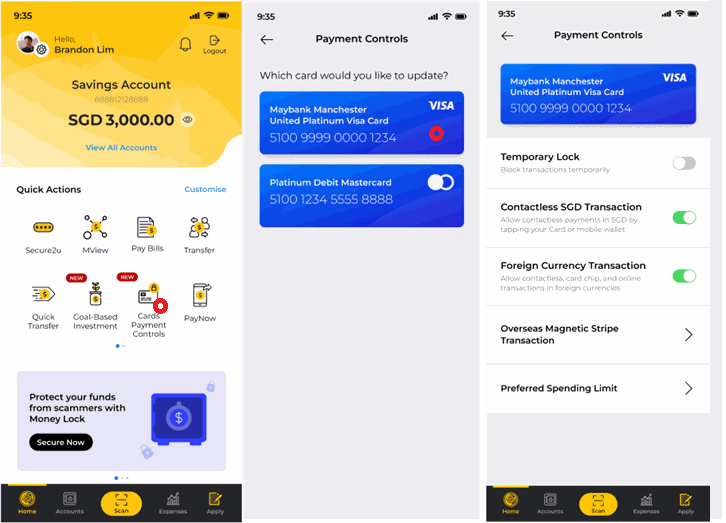
Step 1: Tap on the Card Payment Controls icon under Quick Action
Step 2: Select the Card Type
Step 3: Tap on the transaction type to be turned off or block card temporarily