






Money Lock is an added layer of protection designed to protect the funds in your current or savings account(s) from the reach of scammers
Digital Services
Money Lock
Benefits
Enjoy greater control and peace of mind by locking selected funds in your current or savings account(s), while continuing to earn interest.
| Action | Available channels |
|---|---|
| Lock funds |
|
| Unlock funds |
|
For joint accounts with “All to Sign” operating condition, Money Lock service is only available at any Maybank Singapore branch.
- Top up funds into your Money Lock digitally at any time.
- Continue to earn the same interest on your current or savings account(s) for your Money Lock funds.
- Locked funds cannot be accessed until you unlock them for use.
How to lock your funds
Money Lock on Maybank2u Online Banking
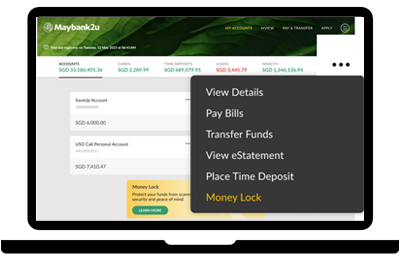
Step 1
• Select an account and click on ‘…’ menu
• Select ‘Money Lock’
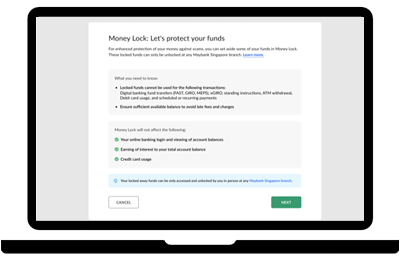
Step 2
• Learn more about Money Lock
• Select ‘Next’
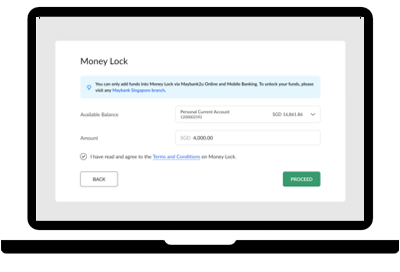
Step 3
• Enter the amount to be locked in Money Lock
• Select ‘Proceed’ and authenticate the transaction
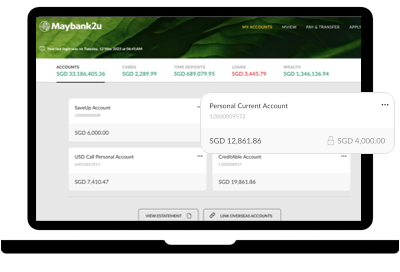
Upon “Proceed’, the amount in Money Lock will be displayed on your account dashboard
Money Lock on Maybank2u SG app

Step 1
• Logon to Maybank2u SG app
• Select ‘Secure Now’
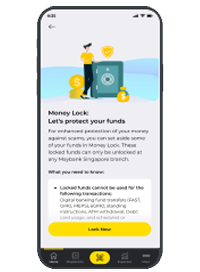
Step 2
• Learn more about Money Lock
• Select ‘Lock Now’
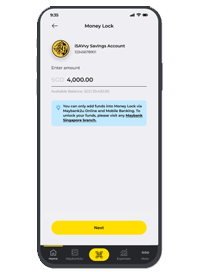
Step 3
• Enter the amount to be locked in Money Lock
• Select ‘Next’ and authenticate the transaction
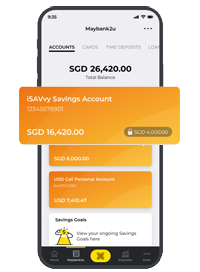
Upon ‘Next’ the amount in Money Lock will be displayed on your account dashboard
Important information
Please note that joint accounts with “All to Sign” operating condition, money lock service is only available at any Maybank branch.