






- Higher base interest and enjoy up to 4% p.a. with Save Up Programme

Privilege Save Up Programme
Become a Maybank Privilege customer and earn up to 7% p.a. with Privilege Save Up Programme.
Terms and Conditions apply.

Premier Save Up Programme
Begin your Premier journey and earn up to 8% p.a. with Premier Save Up Programme.
Terms and Conditions apply.
- Withdraw cash with no service fee at all Maybank ATM and atm5 network in Singapore
- Round-the-clock service with Maybank2u Online and Mobile Banking
- Bi-monthly paper statement
- Lock your savings in Money Lock for greater peace of mind
Savings Account
Start building your savings with higher interest rates of 4% p.a.
Maybank SaveUp Account
Eligibility Requirements
- Minimum 16 years of age
For Singapore Citizens or Permanent Residents:
- Via Myinfo
For Foreigners:
- Via MyinfoNEW
- At the Branch (with original physical documents)
- Passport
- Valid pass (e.g. Employment Pass (EP) or S-Pass or Student Pass)
- Proof of Residential Address (i.e. Utility/Telco bills or Bank statement from another bank in Singapore, where the name must be the same as your Passport and Employment Pass)
How to Apply
Available to Singapore citizens, Singapore Permanent Residents, FIN-holders* and Maybank Malaysia customers
Online application via Myinfo
Step 1: Apply Now
Click under Myinfo Please have your Singpass ID and password ready.
Step 2: Receive Account Number
- You will receive an email with your new account number in a password protected PDF file upon submission of the application
- A password will be sent via SMS to the mobile number indicated on the application form to open the PDF file
If you are not our existing Online Banking Customer, you will receive:
- Online Banking Access ID in the PDF file
- Another SMS which contains your PIN to sign-up or perform a First Time Login to Online Banking
*FIN-holders refer to holders of Employment Pass, S-Pass, Long-term Social Visit Pass and Student Pass.
Application via Maybank2u SG app
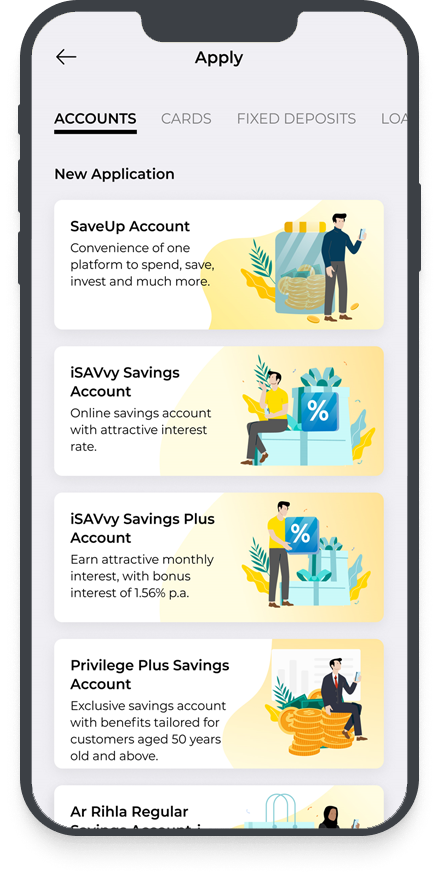
For existing Maybank customers
Step 1: Download the Maybank2u SG app and login with your online banking username and password
Step 2: Tap on ‘More’ > ‘Apply’.
For new customers
Step 1: Download the Maybank2u SG app and tap on ‘More’ > ‘Apply’.
Step 2: Select on the account you wish to open, and apply via Singpass if you are a Singaporean or Singaporean PR. Alternatively, you can apply via M2U Malaysia if you are a Maybank Malaysia customer.
Apply at the Branch (with original physical documents):
- Passport
- Valid pass (e.g. Employment Pass (EP) or S-Pass or Student Pass)
- Proof of Residential Address (i.e. Utility/Telco bills or Bank statement from another bank in Singapore, where the name must be the same as your Passport and Employment Pass)
Fees & Charges
- Fall-below fee (per month) waived for customers below 25 years old
- Please click here to view the other Bank charges applicable for our services
Secure2u Digital Token
To access your account balances on Maybank2u Online and Mobile banking, you are required to register for Secure2u Digital Token to authenticate logins and transaction. Download the Maybank2u SG app to set up your Digital Token today.
Other Information
- Maintain a minimum balance of S$10 in your savings account at all times.
- Terms and Conditions Governing Savings Account (PDF)